h3_toolkit package
h3_toolkit.core module
- class h3_toolkit.core.H3Toolkit[source]
Bases:
object- set_aggregation_strategy(strategies: dict[str | tuple[str], AggregationStrategy]) H3Toolkit[source]
Set the aggregation strategies for the designated columns(properties) in the input data. :param strategies: A dictionary with column names as keys and AggregationStrategy objects as values :type strategies: dict[str | list[str], AggregationStrategy]
- process_from_vector(data: DataFrame | GeoDataFrame, resolution: int = 12, geometry_col: str = 'geometry') H3Toolkit[source]
Process the input data with geo-spatial information and output the data with H3 cells in the specific resolution.
- Parameters:
- Raises:
ResolutionRangeError – The resolution must be an integer from 0 to 15
InputDataTypeError – The input data must be either a GeoDataFrame or a DataFrame with geo-spatial information.
ColumnNotFoundError – The column name set in the aggregation strategies is not found in the input data
- process_from_raster(data: list[list[int | float]], transform, resolution: int = 12, nodata_value: float | int | None = None, return_value_name: str = 'value') H3Toolkit[source]
Processes raster data and converts it into H3 indexes.
- Parameters:
data (list[list[int | float]]) – A 2D list representing the raster data, where each element can be an integer or float.
transform – Transformation matrix or function to apply to the raster data. It is used for spatial referencing of the raster.
resolution (int, optional) – The H3 resolution level to use for the conversion. It must be an integer between 0 and 15. Defaults to 12.
nodata_value (float | int | None, optional) – The value representing “no data” in the raster. If provided, this value will be ignored in processing. Defaults to None.
return_value_name (str, optional) – The name to use for the value column in the resulting DataFrame. Defaults to ‘value’.
- Raises:
ResolutionRangeError – If the resolution is not an integer between 0 and 15.
- Returns:
The updated instance of the H3Toolkit with the processed data.
- Return type:
- process_from_h3(data: DataFrame | None = None, target_resolution: int = 7, source_resolution: int = None, h3_col: str = 'hex_id') H3Toolkit[source]
Processes the input H3 indexed data by converting the resolution of H3 cells and applying aggregation strategies to the data. The function validates the source and target resolutions, ensures the presence of necessary columns, and transforms H3 indexes to a target resolution.
- Parameters:
data (pl.DataFrame, optional) – The input DataFrame containing H3 indexes in the specified h3_col column. If not provided, the method will use previously processed data from self.result. Defaults to None.
target_resolution (int, optional) – The desired H3 resolution for the transformation. Must be between 0 and 15, with the requirement that it be less than the source_resolution. Defaults to 7.
source_resolution (int, optional) – The source H3 resolution of the input data. If not provided, the function will use self.source_resolution, if previously set from process_from_vector() or process_from_raster(). Defaults to None.
h3_col (str, optional) – The name of the column containing H3 index values in the input data. Defaults to ‘hex_id’.
- Returns:
Returns the current instance of the H3Toolkit class, allowing for method chaining.
- Return type:
- Raises:
ResolutionRangeError – If the source or target resolution is outside the valid range (0 to 15), or if the target resolution is greater than or equal to the source resolution.
ColumnNotFoundError – If the specified H3 column (h3_col) is not present in the input DataFrame, or if any columns required for the aggregation strategies are missing.
Example
>>> from h3_toolkit import H3Toolkit
>>> toolkit = H3Toolkit()
>>> df = pl.DataFrame({"hex_id": [...], "value": [...]})
>>> toolkit.set_aggregation_strategy({'value': AggregationStrategy()})
>>> toolkit.process_from_h3(data=df, target_resolution=6, source_resolution=12)
Note
The source resolution must be higher than the target resolution to allow for downscaling.
The aggregation strategies are applied to the transformed H3 data.
The function ensures no duplicate H3 cells exist in the final result.
- set_hbase_client(client: HBaseClient) H3Toolkit[source]
Sets the HBase client for interacting with HBase.
This method sets the HBase client that will be used to fetch and send data to/from HBase. The client must be set before any HBase-related operations can be performed, such as fetch_from_hbase() or send_to_hbase() data.
- Parameters:
client (HBaseClient) – The HBase client object used to interact with HBase. use from h3_toolkit.hbase import HBaseClient to initialize the client.
- Returns:
Returns the instance of the H3Toolkit class with the HBase client set.
- Return type:
Examples
To set an HBase client for further operations: >>> from h3_toolkit.hbase import HBaseClient >>> hbase_client = HBaseClient(fetch_url, send_url) >>> h3_toolkit.set_hbase_client(hbase_client)
- property hbase_client
Gets the current HBase client. Use for checking if the HBase client is set.
- Returns:
The HBase client object if set; otherwise, returns None.
- fetch_from_hbase(table_name: str, column_family: str, column_qualifier: list[str], rowkeys: list[str] = None) H3Toolkit[source]
Fetches data from an HBase table based on H3 index row keys. Starting from the sycnchronous function, will craete a new event loop to run the async function.
Note
This method retrieves data from an HBase table using the H3 indices generated from methods like process_from_vector(), process_from_raster(), or process_from_h3() as row keys.
It is necessary to call set_hbase_client() before using this method to set up the HBase client connection.
- Parameters:
table_name (str) – The name of the table in HBase. For example, ‘res12_pre_data’.
column_family (str) – The name of the column family in HBase. For example, ‘demographic’.
column_qualifier (list[str]) – A list of column qualifiers to retrieve from the HBase table. For example, [‘p_cnt’, ‘h_cnt’].
rowkeys (list[str], optional) – A list of H3 indices to fetch data from the HBase table. If not provided, the method will use self.result, which contains the processed H3 data.
- Returns:
Returns the instance of the H3Toolkit class with the fetched data stored in the self.result attribute.
- Return type:
- Raises:
ValueError – If no H3 index is found in self.result, this error is raised, indicating that the method requires H3 data to proceed.
HBaseConnectionError – If the HBase client is not set, this error is raised. The user must first call set_hbase_client() to initialize the connection to HBase.
Examples
To fetch data from an HBase table ‘res12_pre_data’ under the ‘demographic’ column family with the column qualifiers ‘p_cnt’ and ‘h_cnt’:
>>> from h3_toolkit import H3Toolkit
>>> toolkit = H3Toolkit()
>>> toolkit.set_hbase_client(hbase_client)
>>> toolkit.process_from_vector(vector_data)
>>> toolkit.fetch_from_hbase('res12_pre_data', 'demographic', ['p_cnt', 'h_cnt'])
>>> # or
>>> toolkit = H3Toolkit()
>>> hex_ids = ['8c4ba1d2914b9ff', '8c4ba1d2914b8ff', '8c4ba1d2914b7ff']
>>> toolkit.set_hbase_client(hbase_client)
>>> toolkit.fetch_from_hbase('res12_pre_data', 'demographic', ['p_cnt', 'h_cnt'], rowkeys=hex_ids)
- send_to_hbase(table_name: str, column_family: str, column_qualifier: list[str], h3_col: str = 'hex_id', timestamp=None) H3Toolkit[source]
Sends data to an HBase table based on self.result, which retrieved by process_from_vector(), process_from_raster(), or process_from_h3().
This method sends the processed data stored in self.result to an HBase table. You must call set_hbase_client() before using this method to set up the HBase client connection. The data is sent using the H3 index as the row key and the specified column family and column qualifiers.
- Parameters:
table_name (str) – The name of the table in HBase. For example, ‘res12_pre_data’.
column_family (str) – The name of the column family in HBase. For example, ‘demographic’.
column_qualifier (list[str]) – A list of column qualifiers to send to the HBase table. For example, [‘p_cnt’].
h3_col (str, optional) – The name of the column that contains the H3 index. Defaults to ‘hex_id’.
timestamp (int, optional) – The timestamp for the data. Defaults to None, in which case the current time is used.
- Returns:
Returns the instance of the H3Toolkit class after sending data to HBase.
- Return type:
- Raises:
ValueError – If no processed data is found in self.result, this error is raised, indicating that the method requires data to be processed first.
HBaseConnectionError – If the HBase client is not set, this error is raised. The user must first call set_hbase_client() to initialize the connection to HBase.
Example
To send data to an HBase table ‘res12_pre_data’ under the ‘demographic’ column family with the column qualifier ‘p_cnt’:
>>> from h3_toolkit import H3Toolkit
>>> toolkit = H3Toolkit()
>>> toolkit.set_hbase_client(hbase_client)
>>> toolkit.process_from_vector(vector_data)
>>> toolkit.send_to_hbase('res12_pre_data', 'demographic', ['p_cnt'])
- apply(func) H3Toolkit[source]
Apply a function to the result of the data processing. The function is applied using the Polars DataFrame pipe method. so the input and output of the function should be a Polars DataFrame.
- get_result(return_geometry: bool = False) DataFrame | GeoDataFrame[source]
Retrieves the result of the data processing, optionally converting H3 cells back to geometries.
This method returns the processed data, which can either remain in H3 cell format or be converted back to geometries if the return_geometry option is set to True. If the data has not been processed yet, it raises an error.
- Parameters:
return_geometry (bool, optional) – Whether to convert the H3 cells to geometries. Defaults to False. If set to True, the result will be returned as a GeoDataFrame with geometries corresponding to the H3 cells.
- Returns:
The processed data. If return_geometry is False, a Polars DataFrame with H3 cell IDs is returned. If return_geometry is True, a GeoDataFrame with geometries is returned.
- Return type:
pl.DataFrame | gpd.GeoDataFrame
- Raises:
ValueError – If the data has not been processed before calling this method.
Example
>>> from h3_toolkit import H3Toolkit
>>> toolkit = H3Toolkit()
>>> toolkit.process_from_vector(geo_df)
>>> result = toolkit.get_result(return_geometry=True)
Note
The method checks if the result has been processed before retrieval, raising a ValueError if the data is not available.
If return_geometry is True, the method will convert H3 cells into geometries using the cell_to_geom method and return a GeoDataFrame.
The resulting data will have any null values filled with 0 before being returned.
Future versions might include functionality to merge identical rows and process geometries more efficiently.
h3_toolkit.aggregation module
- class h3_toolkit.aggregation.SplitEqually(agg_col: str)[source]
Bases:
AggregationStrategy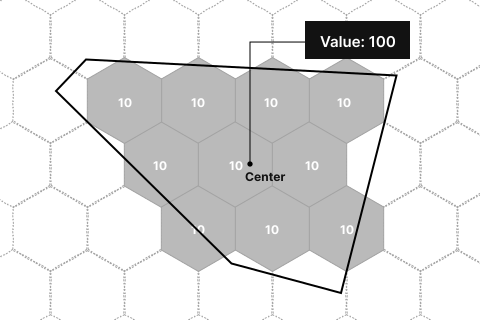
- class h3_toolkit.aggregation.Centroid[source]
Bases:
AggregationStrategy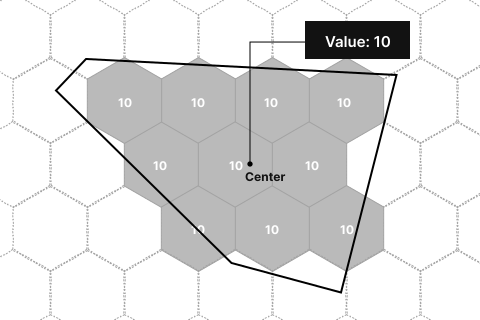
- class h3_toolkit.aggregation.SumUp[source]
Bases:
AggregationStrategy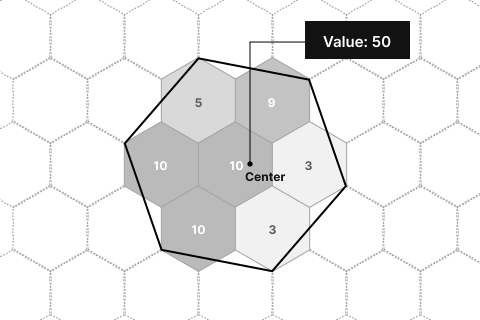
- class h3_toolkit.aggregation.Mean[source]
Bases:
AggregationStrategy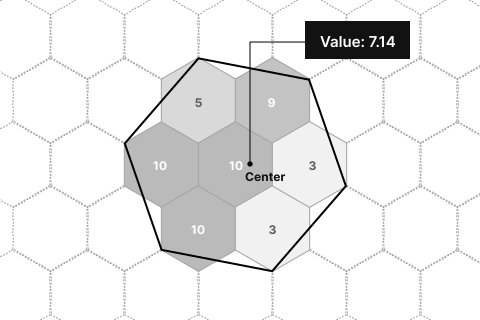
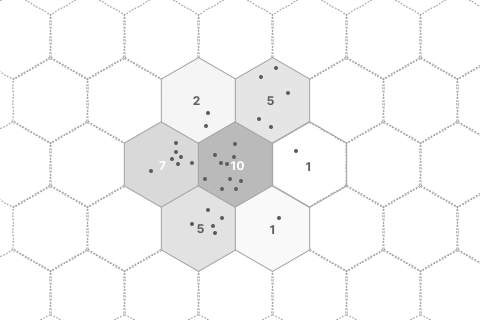
h3_toolkit.hbase module
- class h3_toolkit.hbase.HBaseClient(*args, **kwargs)[source]
Bases:
objectInitializes the HBaseClient instance for fetching and sending data to HBase servers.
This client supports fetching and sending data to HBase via URLs and controls the maximum number of concurrent requests and the chunk size per request to ensure efficient data processing and transmission.
Note
The semaphore attribute is used to limit the concurrency of requests to the HBase server, ensuring the client adheres to the server’s request limits.
The chunk_size determines the number of row keys processed per request, which helps balance between performance and server load.
- Parameters:
fetch_url (str) – The URL used for fetching data from the HBase server.
send_url (str) – The URL used for sending data to the HBase server.
token (str) – Get the user token from http://10.100.2.218:2891/swagger/index.html# by registering an account.
max_concurrent_requests (int, optional) – The maximum number of concurrent requests allowed. Defaults to 5.
chunk_size (int, optional) – The number of row keys processed per request chunk. Defaults to 200,000.
- token
The token used for authentication, get from http://10.100.2.218:2891/swagger/index.html#/user/post_user_login.
- Type:
- semaphore
Controls the number of concurrent requests that can be processed simultaneously to prevent overwhelming the server.
- Type:
Example
>>> client = HBaseClient(fetch_url="http://hbase-fetch-url",
>>>                      send_url="http://hbase-send-url",
>>>                      token="aaaa.bbbbb.ccccc",
>>>                      max_concurrent_requests=5,
>>>                      chunk_size=200000)
>>> # Fetch and send data using the client
- async afetch_data(table_name: str, column_family: str, column_qualifier: list[str], rowkeys: list[str])[source]
This coroutine is used by afetch_from_hbase
- fetch_data(table_name: str, column_family: str, column_qualifier: list[str], rowkeys: list[str]) DataFrame[source]
Starting a new event loop to fetch data from HBase in async mode. NOTICE: This function can’t fit with fastapi, because it will start a new event loop. If you want to use this function in fastapi, you should use the async function afetch_data
- Parameters:
table_name – str, the table name in HBase, ex: “res12_pre_data”
cf – str, the column family in HBase, ex: “demographic”
cq_list – list[str], the column qualifier in HBase, ex: [“p_cnt”, “h_cnt”]
rowkeys – list[str], the rowkeys to be fetched, ex: [“8c4ba0a415749ff”,”8c4ba0a415741ff”]
- Returns:
the fetched data in polars DataFrame
- Return type:
pl.DataFrame
h3_toolkit.utils module
- h3_toolkit.utils.geom_to_wkb(df: GeoDataFrame, geometry: str) DataFrame[source]
convert GeoDataFrame to polars.DataFrame (geometry to wkb)
- h3_toolkit.utils.wkb_to_cells(df: DataFrame, resolution: int, geom_col: str = None, mode: ContainmentMode = ContainmentMode.ContainsCentroid) DataFrame[source]
convert geometry to h3 cells df: polars.DataFrame, the input dataframe source_r: int, the resolution of the source geometry selected_cols: list, the columns to be selected
h3_toolkit.exceptions module
- exception h3_toolkit.exceptions.ColumnNotFoundError[source]
Bases:
ExceptionRaised when a required column is not found in the input data.
- exception h3_toolkit.exceptions.ResolutionRangeError[source]
Bases:
ExceptionRaised when the resolution is not in the range of 0 to 15.
- exception h3_toolkit.exceptions.InputDataTypeError[source]
Bases:
ExceptionRaised when the input data is not a GeoDataFrame or a DataFrame with geo-spatial information.